Features · dApp Browser
Features · dApp Browser
Browse and use any dApp inside your wallet
Browse and use any dApp inside your wallet
Atom Wallets has a browser built in. Search the web, open a dApp, connect your wallet in one tap and approve every action yourself.
Atom Wallets has a browser built in. Search the web, open a dApp, connect your wallet in one tap and approve every action yourself.
Built-in browser
Search or enter any address
Connect in one tap
No QR code needed
Built-in browser
Search or enter any address
Connect in one tap
No QR code needed
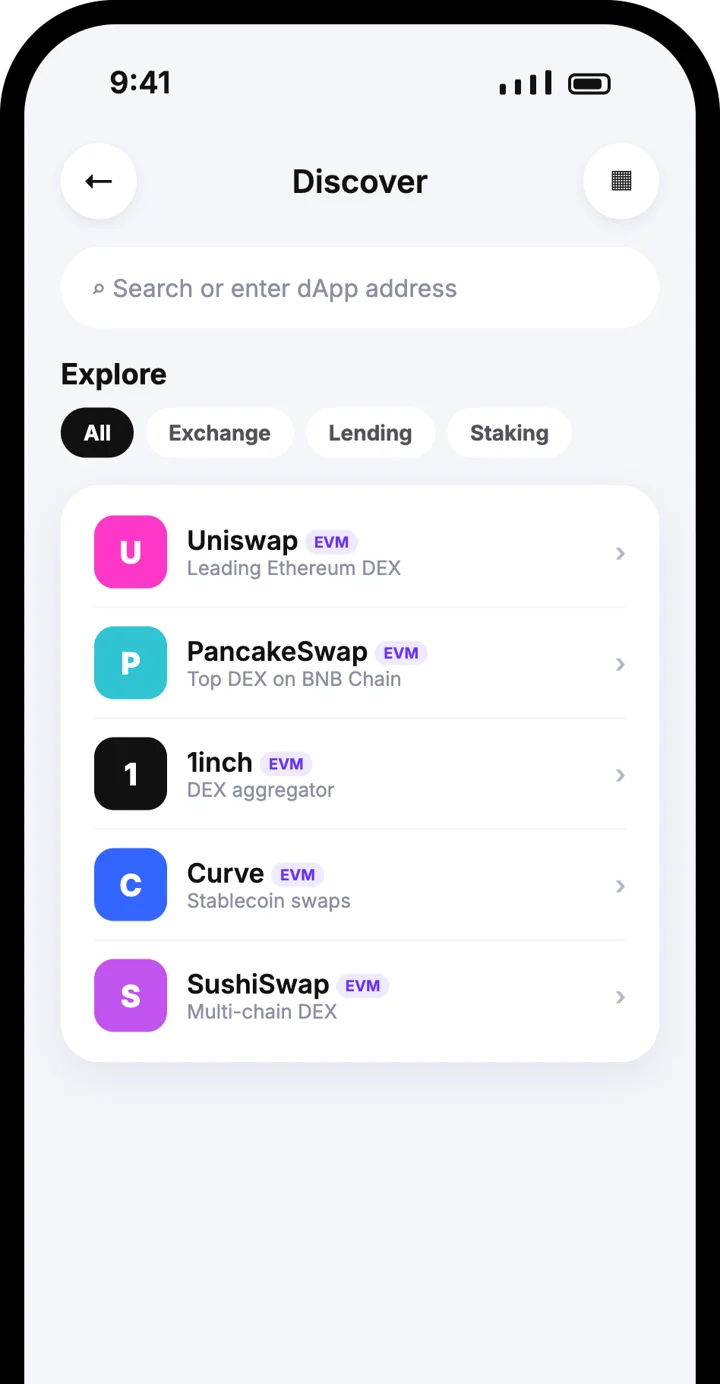



dApp browser
dApp browser
Search, open, connect
Search, open, connect
Find a dApp in Discover, open it inside the wallet and connect without scanning anything.
Search the web or enter a dApp address
Explore exchanges, lending and staking apps
Every transaction needs your approval
How it works
How it works
1
Open Discover
Tap the globe icon in Atom Wallets to open the dApp browser.
1
Open Discover
Tap the globe icon in Atom Wallets to open the dApp browser.

2
Search or explore
Type a dApp address or search term, or choose a dApp from the Explore list.
2
Search or explore
Type a dApp address or search term, or choose a dApp from the Explore list.
3
Connect your wallet
Tap Connect wallet on the dApp and confirm in Atom Wallets.
3
Connect your wallet
Tap Connect wallet on the dApp and confirm in Atom Wallets.

4
Use the dApp
Swap, lend, stake or sign in. Each transaction asks for your approval first.
4
Use the dApp
Swap, lend, stake or sign in. Each transaction asks for your approval first.
Explore by category
Explore by category
The Explore list groups popular dApps so you can find what you need quickly.
Exchange
Exchange
Lending
Lending
Staking
Staking
Uniswap
Uniswap
PancakeSwap
PancakeSwap
1inch
1inch
Curve
Curve
SushiSwap
SushiSwap
Balancer
Balancer
Why use the built-in browser
Why use the built-in browser

Everything in one app
No switching between your wallet and a separate browser. The dApp opens right where your crypto is.
Everything in one app
No switching between your wallet and a separate browser. The dApp opens right where your crypto is.
No QR code
Because the dApp runs inside the wallet, connecting takes one tap.
No QR code
Because the dApp runs inside the wallet, connecting takes one tap.

A real browser
Search with Google, check a project’s website, then connect when you are ready.
A real browser
Search with Google, check a project’s website, then connect when you are ready.

You stay in control
Your keys stay on your phone and every transaction needs your approval.
You stay in control
Your keys stay on your phone and every transaction needs your approval.
Frequently asked questions
Frequently asked questions
What is the dApp browser?
How do I connect my wallet to a dApp?
Which dApps can I use?
Can I use it as a normal browser?
Can a dApp move my funds?
What if the dApp is on my computer?
How do I stay safe?
Keep exploring
Keep exploring
Download the Atom app
Send USDT without holding TRX, swap in seconds, withdraw to your local bank and get 24/7 human support — with keys that stay on your device.


Download the Atom app
Send USDT without holding TRX, swap in seconds, withdraw to your local bank and get 24/7 human support — with keys that stay on your device.