Features · Buy Crypto

Features · Buy Crypto

Buy crypto with your card, Apple Pay or Google Pay

Buy crypto with your card, Apple Pay or Google Pay

Enter an amount in your local currency, pick a coin and pay the way you already pay for everything else. The crypto lands in your own wallet.

Enter an amount in your local currency, pick a coin and pay the way you already pay for everything else. The crypto lands in your own wallet.

Apple Pay

Google Pay

Debit and credit cards

Local currencies

Apple Pay

Google Pay

Debit and credit cards

Local currencies

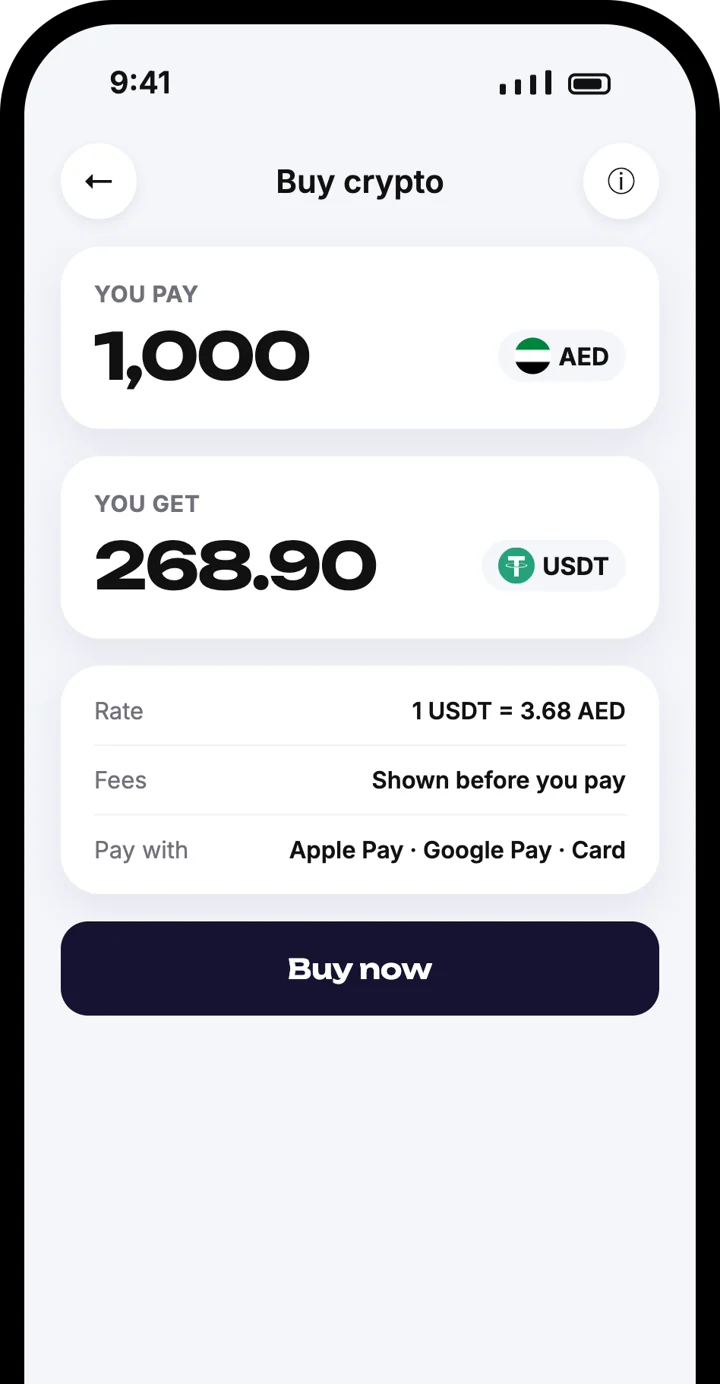
Atom Wallets app screen

Buy crypto

Buy crypto

From your card to your wallet

From your card to your wallet

Enter the amount, choose the coin, check the fees and confirm with Apple Pay, Google Pay or your card.

Pay in your local currency

Rate and fees shown before you pay

Crypto arrives in your own wallet

How to buy crypto in four steps

How to buy crypto in four steps

Enter the amount

1

Enter the amount

Type how much you want to spend in your local currency, such as AED, EUR or USD.

Enter the amount

1

Enter the amount

Type how much you want to spend in your local currency, such as AED, EUR or USD.

Choose your coin

2

Choose your coin

Pick the cryptocurrency you want. You see the rate and how much you will receive.

Choose your coin

2

Choose your coin

Pick the cryptocurrency you want. You see the rate and how much you will receive.

Check the fees

3

Check the fees

All fees are shown before you pay. Tap Buy now when you are happy with the total.

Check the fees

3

Check the fees

All fees are shown before you pay. Tap Buy now when you are happy with the total.

Pay and receive

4

Pay and receive

Confirm with Apple Pay, Google Pay or your card. The crypto arrives in your wallet.

Pay and receive

4

Pay and receive

Confirm with Apple Pay, Google Pay or your card. The crypto arrives in your wallet.

Why buy inside Atom Wallets

Why buy inside Atom Wallets

Pay your usual way

Pay your usual way

Use Apple Pay, Google Pay or the card already in your pocket. No bank transfer forms.

Pay your usual way

Pay your usual way

Use Apple Pay, Google Pay or the card already in your pocket. No bank transfer forms.

Fees shown first

Fees shown first

You see the rate, the fees and the amount you receive before you confirm anything.

Fees shown first

Fees shown first

You see the rate, the fees and the amount you receive before you confirm anything.

Straight to your own wallet

Straight to your own wallet

What you buy goes directly to your self-custody wallet. Your keys, your crypto.

Straight to your own wallet

Straight to your own wallet

What you buy goes directly to your self-custody wallet. Your keys, your crypto.

Your local currency

Your local currency

Pay in your everyday currency. Supported currencies depend on your country.

Your local currency

Your local currency

Pay in your everyday currency. Supported currencies depend on your country.

Good to know

Good to know

Purchases are processed by licensed third-party payment providers, not by Atom Wallets. Availability, limits and payment methods vary by country, and the provider may ask you to verify your identity.

Good to know
Good to know

Frequently asked questions

Frequently asked questions

How do I buy crypto in Atom Wallets?

Which payment methods can I use?

Which currencies can I pay in?

What fees will I pay?

Where does the crypto go?

Who processes the payment?

How long does it take?

Download the Atom app

Send USDT without holding TRX, swap in seconds, withdraw to your local bank and get 24/7 human support — with keys that stay on your device.

Atom Wallets app screen

Download the Atom app

Send USDT without holding TRX, swap in seconds, withdraw to your local bank and get 24/7 human support — with keys that stay on your device.

Atom Wallets app screen